No upfront payment
A group video gift is one video made from photos, messages or clips that many people send for one person. The easiest way is a service that collects everything through one link and lets you preview before paying. Start at least two days early. Choose clips for voices, or photos with short messages for the most guests. The video above is our example, made for a mother’s 65th birthday.

How to make a group video gift
Video gift for Mom’s 65th birthday
Everyone adds photos
What happens when everyone sends a photo for one person?
The person sees their whole life on one screen, and sees who remembered each moment. Picture the day: friends and family sit down together, the video starts, and one photo after another appears, each with a few words and a round portrait of the sender. In our example, a mother’s 65th birthday, she kept stopping to remember where and when each photo was taken, and almost cried.
- Birthday, wedding, farewell
- Everyone who cares
- On the TV or on phones
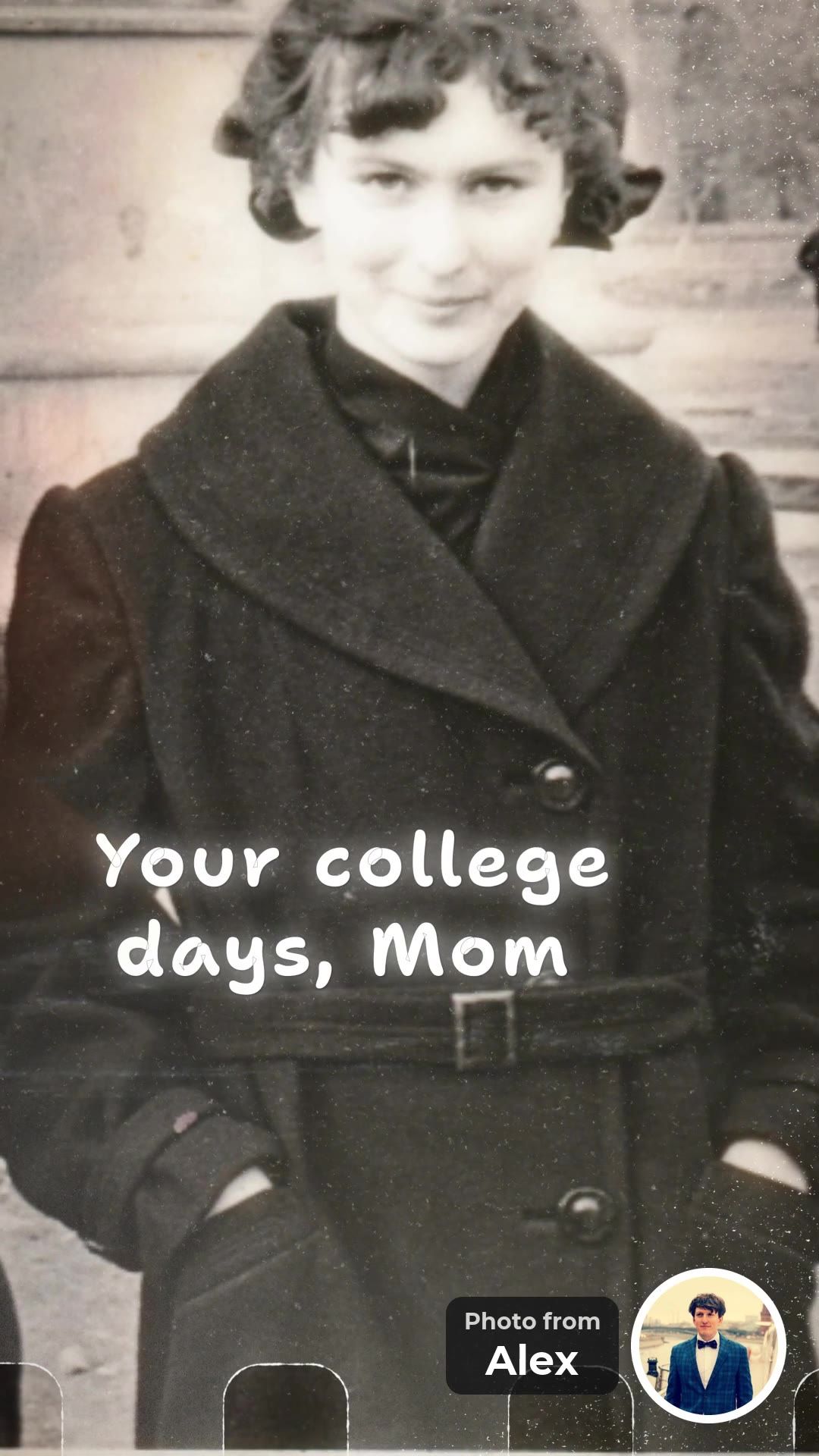
Your college days, Mom
Alex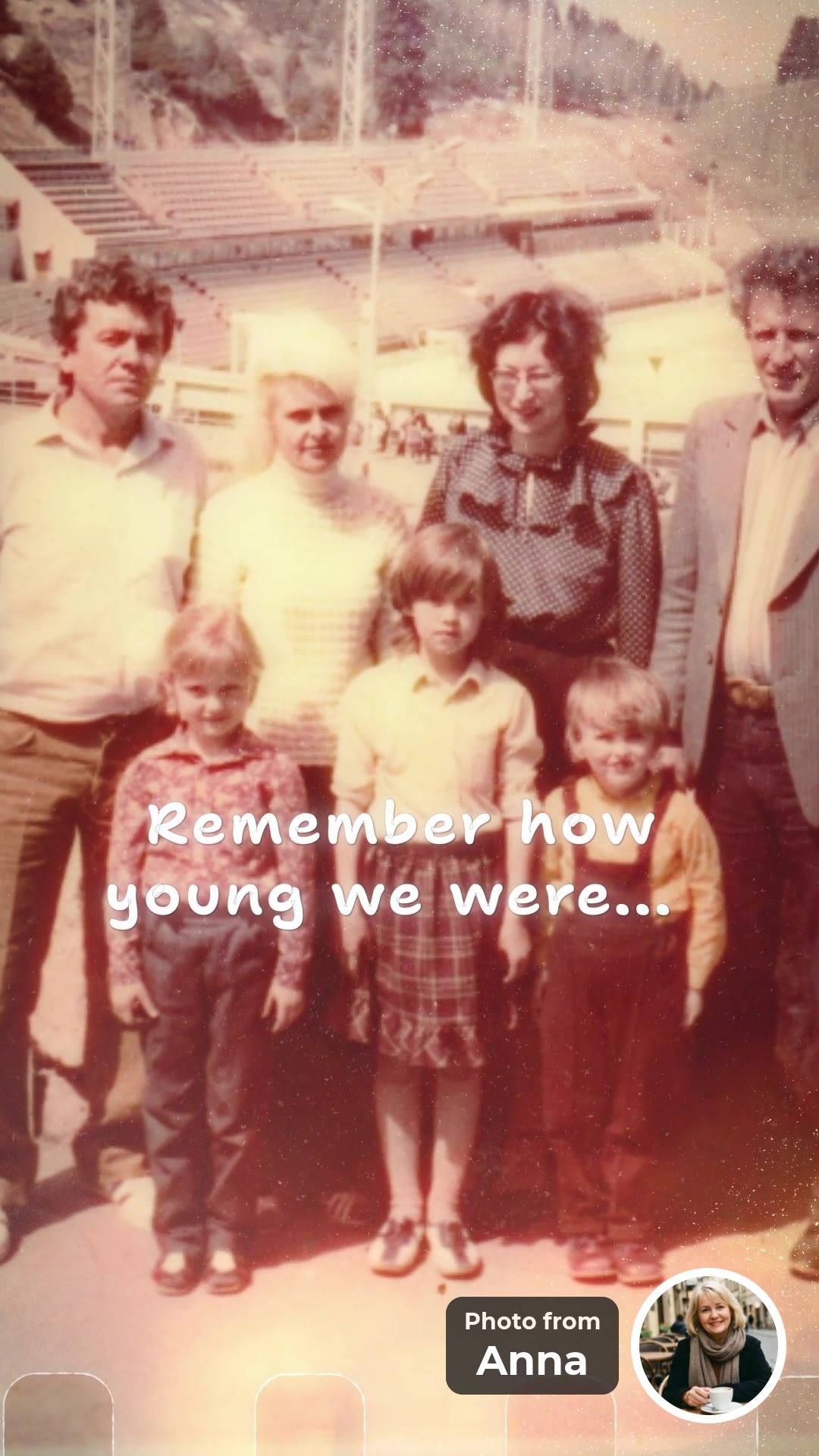
Remember how young we were...
Anna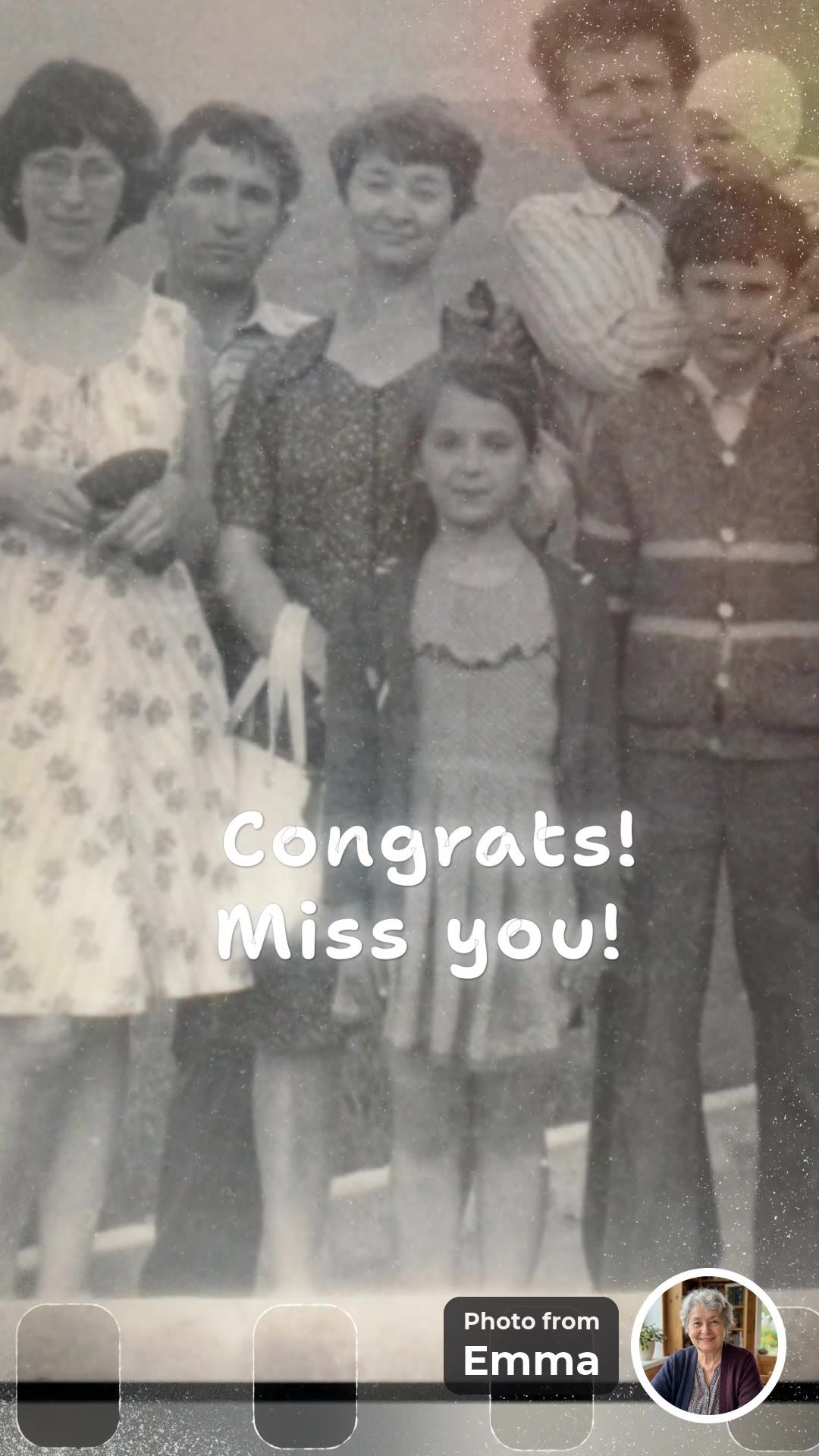
Congrats! Miss you!
Emma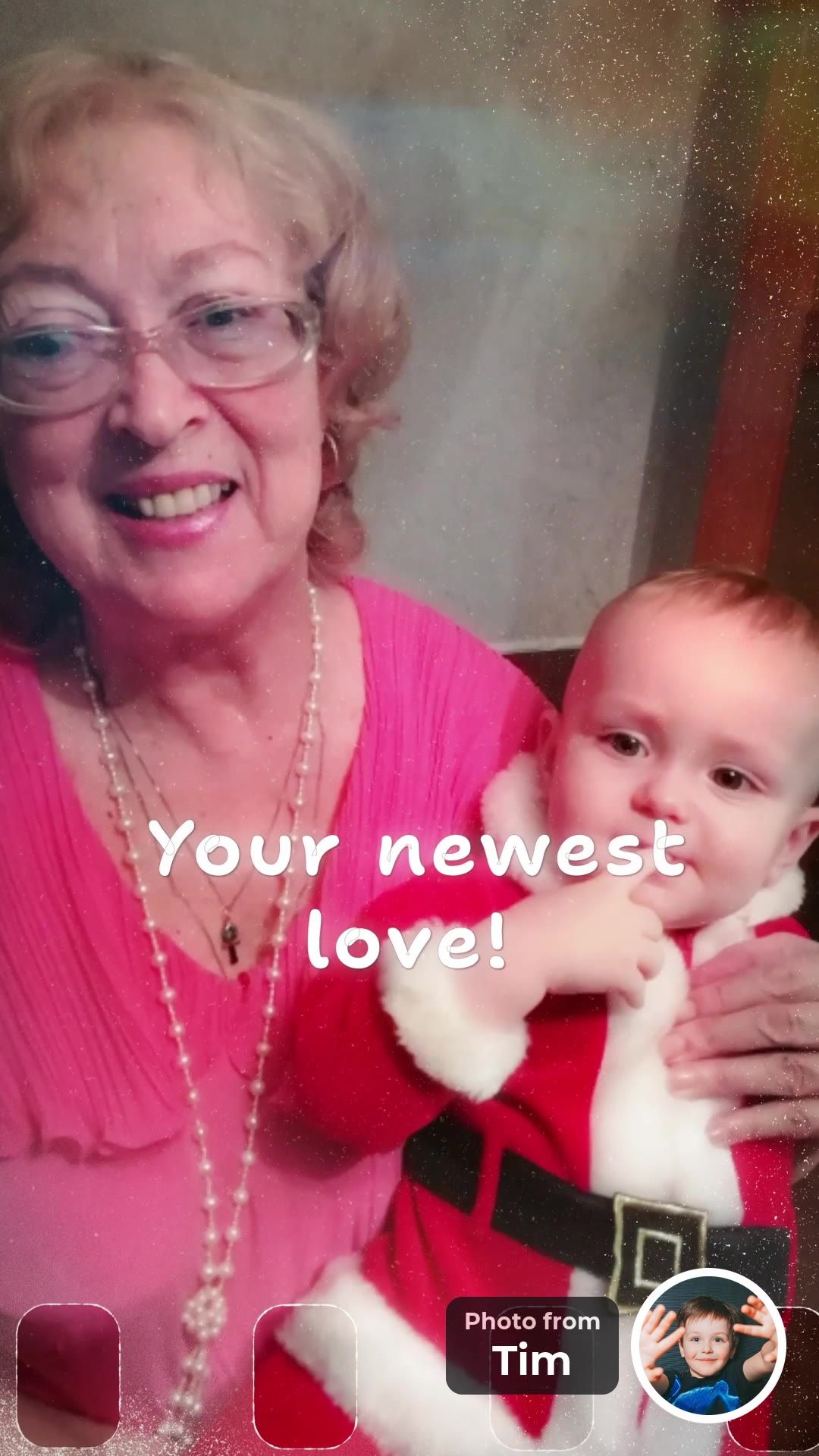
Your newest love!
Tim


In our example, 8 people from 3 countries sent 19 photos in two days. Each photo came with a small round portrait, so she knew at once who sent it.
The idea works for a birthday, a wedding, an anniversary, a retirement or Mother’s Day: a gift that is not an object, and proof that many people care.
Happy tears for everybody, memories forever.
Why does a video from everybody feel better than a gift from a shop?
Because every photo is a person saying “I think of you”. A mug goes into a cupboard and flowers fade in a week. A video made of photos from many people can be watched again and again, and each photo shows who remembered that moment.

- 1A photo from the guest’s own archive. Each person finds one that only they have.
- 2A round portrait. It shows who the photo is from, so the person knows whose memory it is.
- 3A few words. Up to 40 characters, in the guest’s own voice.
Where they studied. Where they worked. Who stood next to them at the wedding. Each photo is a memory that only one person kept. That is why the evening is full of memories, smiles and a few happy tears.
Is there a version for phones and social media too?
Yes. At FromAll.gift you get two videos made at the same time from the same photos: a horizontal 16:9 video for the TV and a vertical 9:16 video for phones and social media. Both are included in the price, so you do not choose one or pay twice.
- 16:9 for the TV and laptop. Play it at the party, on a wide screen without black bars.
- 9:16 for phones and social media. It fills a phone screen from edge to edge. Send it in a chat or post it.
- Made at the same time. The same photos, messages and music, and a designed frame for every photo.
Who can add a piece of themselves to a group video?
Anyone who has a photo with the person, in a phone or in a drawer. That means relatives, friends, acquaintances, classmates, colleagues, neighbors, children and grandchildren. Each adds a photo and a few words, and a round portrait shows who it is from.
- acquaintances
- friends
- cousins
- classmates
- godchildren
- old neighbors
- grandchildren
- college friends
- relatives
- former colleagues
- in-laws
- neighbors
- colleagues
- nieces and nephews
- hobby friends
- childhood friends
- children
- family friends
Send a link
Will they really do it? Isn’t it a lot to ask?
No. Each person needs a minute or two: open the link, choose one or two photos with the person and write a few words. At FromAll.gift there are no selfie videos, no sign-up and no app. Guests in other countries use the same link.
- Step 1Open the link.
- Step 2Choose one or two photos with the person.
- Step 3Write a few words and add your portrait. Done.
- No sign-up
- No app
Asking for a video clip is a big request. A person has to find a quiet corner and look into a camera, and many put it off. A photo is easy: everyone already has one with the person.
You do not have to chase people one by one. The app writes the invitation for you, and after adding a photo each guest is asked who else should be in the video. So the link spreads on its own.
Two promises
- No selfie videosGuests add a photo and a few words. Nobody has to film themselves.
- No upfront paymentStart free and watch the preview first. You pay once, after you see the video.
Start a video gift. Add a few photos, post one link in the chat and watch the video before you pay.
Create a video giftFree to start. No upfront payment.
The practical part
Steps, clips or photos, a price comparison, timing and what to write.
What are the key facts about group video gifts?
Starting takes you about five minutes, and each guest needs about one minute. At FromAll.gift the video is built in up to 10 hours and guests need no sign-up. Group video gifts cost about $5 to $100 or more, depending on the service and the length (prices checked October 20, 2026).
- ~5 minYour timeto start. Each guest needs about 1 minute (FromAll.gift).
- up to 10 hBuild timeat FromAll.gift after you press “Make the video”.
- $5–$100+Price rangedepending on service and length (checked October 20, 2026).
- No sign-upGuestsneeded at FromAll.gift; one link for everyone.
What is a group video gift?
A group video gift is a single video assembled from contributions by many people, made for one person. The contributions are usually photos, short written messages or short video clips. One person organizes: they create the project, share a link, and a tool assembles the result.
It is most often made for a birthday, wedding, anniversary, retirement or farewell, and for Mother’s Day or Father’s Day. The appeal is simple: it is a gift that is not another object, and it shows how many people care.
There are three common kinds:
Clip compilations
Guests record or upload short videos of themselves. VidDay and Tribute are built around this.
Photo-and-message videos
Each guest adds a photo and a sentence or two, and the tool turns them into one edited video. FromAll.gift works this way.
Digital boards
Guests post messages, photos and GIFs on a shared page. Kudoboard is the best-known example; it is a board rather than an edited video.

How do you make a group video gift, step by step?
Pick a date, collect everything through one link, then preview and fix before you share. The steps are the same for every service. You need about five minutes to start, and most of the time goes to waiting for guests to reply:
- Pick the person, the date and a contribution deadline. Set the deadline two or three days before the event, so you have time to preview and fix things.
- Decide between clips and photos. The next section helps you choose.
- Choose a tool and start the project. With FromAll.gift you first add a few photos of your own, which takes about five minutes.
- Send one link to everyone. Post it in the family or friends chat instead of messaging people one by one. Ask for one or two photos with the person and a few words.
- Send one friendly reminder the day before the deadline, ideally in the same chat where you shared the link.
- Preview, fix, then share. Check the order, crops and spelling. At FromAll.gift you can edit as often as you like until you pay, and friends can watch through the same link.

Should guests send video clips or photos?
Choose clips if hearing voices matters most and your group is comfortable on camera. Choose photos with short messages if you want the most people to take part. Asking people to film themselves is the biggest hurdle in most groups, so the format you pick decides how many people say yes.
Video clips
- You hear voices and see faces moving.
- Guests must record themselves, so shy, older or distant relatives often skip it.
- Lighting, sound and framing differ from clip to clip.
Photos and short messages
- Takes about a minute and works for almost anyone.
- One consistent look, because every contribution is shaped the same way.
- No voices. The warmth comes from the photo and the words.
Photos also unlock something clips cannot: a picture from the sender’s own archive, such as a childhood photo or a holiday from twenty years ago, that nobody else has.
Which group video gift service should you choose?
Pick VidDay for short clip-based videos on a small budget, Tribute for longer tributes with optional editor help, Kudoboard for a quick digital card, and FromAll.gift for photo-based videos with a consistent, designed look. We make one of these, so every competitor detail below comes from its own pricing page, read on October 20, 2026 (Kudoboard: October 17, 2026).
| Option | Guests add | Price | When you pay | Best for |
|---|---|---|---|---|
| FromAll.gift | Photos and a short message each (up to 40 characters); no sign-up | $39 for up to 15 photos, $49 for up to 30. Includes a 16:9 and a 9:16 version | After you watch the preview | Mixed-age or camera-shy groups; one consistent look |
| VidDay | Video clips and photos | $5 up to 3 min, $15 up to 10 min, $35 up to 20 min, more for longer videos; memberships from $4.99/month | After you see the full video | Short videos on a small budget; hearing voices; keepsakes |
| Tribute | Video messages | DIY from $35 (up to 30 min); Concierge $99, where Tribute’s editors polish the video | Before you publish and start collecting | Longer tributes; optional editor help |
| Kudoboard | Messages, photos and GIFs; video on higher tiers | $6.99 (20 posts), $9.99 (100 posts, with video), $19.99 (unlimited) | Per board; see Kudoboard for timing | A quick digital card rather than an edited video |
| Do it yourself | Whatever people send in a chat | Free to low cost, but it takes your time | Not applicable | Very small groups and people who enjoy editing |
Prices in US dollars, taken from each company’s public pricing page: VidDay and Tribute on October 20, 2026, Kudoboard on October 17, 2026. They can change; check the linked page before you buy.
Two things to notice. First, “pay after you watch” is not unique to us: VidDay says you pay after you have seen your full video, while Tribute asks for payment before you publish and start collecting. Second, on a short video VidDay is the cheaper option. What you pay more for at FromAll.gift is a photo-based video that does not need anyone to film, a consistent look, and both a TV version and a phone version.
Choose FromAll.gift if
- Your guests are of mixed ages or uneasy on camera.
- You want one consistent, designed look instead of a patchwork of clips.
- You want a 16:9 version for the TV and a 9:16 version for phones.
- You want to see the video before paying and fix it freely until you do.
Choose something else if
- You want to hear voices and see faces: VidDay or Tribute.
- You need a short video at the lowest price: VidDay.
- You want a long tribute or editor help: Tribute Concierge.
- You want a physical keepsake such as a video book: VidDay or Tribute both list one.
- The event is tomorrow: a shared digital card or a simple group message is safer.
It takes about 5 minutes to start. Each guest needs about 1 minute. You pay only after you have watched the video.
Create a video giftFree to start. No upfront payment.
What does a real group video gift look like?
Our example is a surprise for a mother’s 65th birthday, made by 8 people from 3 countries. It is the video at the top of this page. Each person added photos from their own archive and a short line of text, and collecting took two days. The video comes in two versions: 16:9 for the TV and 9:16 for phones.
- 8 people
- 3 countries
- 19 photos
- 2 days to collect
On screen you see the full photo, the message, and a small round portrait with a “Photo from …” label, so the mother knows who sent each one. Some of the messages:
- “Love you, my dear!”
- “Love you, sis!”
- “The whole family together”
How much does a group video gift cost?
Roughly $5 to $100, depending on the service and the length of the video. As of October 20, 2026, VidDay charges $5 for a video of up to three minutes and $15 for up to ten minutes, with memberships from $4.99 a month. Tribute’s DIY plan starts at $35 and its editor-assisted Concierge plan is $99. Kudoboard boards run from $6.99 to $19.99 (checked October 17, 2026).
At FromAll.gift a video costs $39 for up to 15 photos or $49 for up to 30 (at least 10 photos are needed), and both a TV version (16:9) and a social version (9:16) are included. Building the video and watching the preview are free; you pay once, after you have watched it and want it.
Before you start, check how the total is calculated. Some services price by video length, others by number of posts or photos, and add-ons such as keepsakes cost extra.
How long does it take?
Plan for about a week from start to finish, and never less than two days. Most of the time is people replying, not the video itself. The video takes up to 10 hours at FromAll.gift. A schedule that works:
- 7 days beforeCreate the project and send the link.
- 4 days beforeSend one reminder.
- 2 days beforeClose contributions and ask for the finished video.
- 1 day beforePreview, fix, and pay if you are happy.
- The day itselfShare it on the TV or by link.
At FromAll.gift you spend about five minutes setting up, each guest needs about one minute, and the video is built in up to ten hours after you press “Make the video”. If it is not ready within twenty hours, you can cancel the order and go back to editing. If the event is tomorrow, choose a simpler gift, because a video that needs hours to build can miss the date.
What should people write?
A few words about one specific memory beat a long greeting. At FromAll.gift the line under each photo is limited to 40 characters, which suits the screen: short text is easier to read in a video and sounds more personal than “Happy birthday, we love you”. You can paste these prompts into your invitation message:
“The summer we got lost. Best trip ever.”
“You never let go of my bike seat.”
“Thank you for answering at 2 a.m.”
“Our first photo together. So small!”
“Your cooking made every holiday home.”
“You believed in me first.”
Ask guests to choose a photo where the person is clearly visible, and to avoid very dark or blurry pictures. Old photos work well: the example frame above is an old family photo.
What can go wrong, and how do you avoid it?
Nobody replies
Share the link in a group chat, ask for just a photo and a few words, and give a deadline. A request that takes one minute is much easier to answer than one that needs filming.
The photos are old or uneven
Mixed quality is normal. Ask people to pick the clearest photo they have, and check the crop in the preview before you pay.
The surprise leaks
Share the link only in private chats and ask guests to keep it quiet. Send the finished video to the person only at the time you choose.
The deadline slips
Set the contribution deadline earlier than you need it. Two spare days cost nothing and make the schedule far less stressful.
Frequently asked questions
What is a group video gift?
It is one video made from photos, messages or clips that many people send for one person, usually for a birthday, wedding, anniversary, retirement or Mother’s Day. One person organizes it and shares a link, and a tool assembles the contributions.
Do guests need to create an account?
At FromAll.gift guests do not need to sign up; they open the link and add a photo and a short message. Other services have their own rules, so check the one you choose.
Can I make a group video gift for free?
Creating a project and previewing the result is free at FromAll.gift and VidDay; you pay only for the final video. Tribute requires payment before you publish your page and start collecting.
How much does a group video gift cost?
From about $5 to $100 or more, depending on the service and the length of the video. At FromAll.gift a video costs $39 for up to 15 photos or $49 for up to 30, with both a TV version and a social version included.
How many photos can I include?
At FromAll.gift a video needs at least 10 photos in total. It holds up to 15 photos (up to 90 seconds) for $39 or up to 30 photos (up to 180 seconds) for $49, and every guest can add several photos. Both a TV version (16:9) and a social version (9:16) are included.
How long can the text under each photo be?
At FromAll.gift the line under each photo can be up to 40 characters, so a few words about one memory work best.
How long does it take to get the finished video?
At FromAll.gift the video is built in up to 10 hours after you press “Make the video”. If it is not ready within 20 hours you can cancel the order and go back to editing. Allow extra days for guests to send their photos.
Can I change something after I see the preview?
Yes. At FromAll.gift you can edit your photos as many times as you like until you pay. After payment, edits are closed.
What if I want video clips instead of photos?
Choose a clip-based service such as VidDay or Tribute. They collect short videos from guests, so you hear voices, but guests must record themselves.
What format is the finished video?
FromAll.gift gives you a 16:9 version for TV and computers and a 9:16 version for phones and social media.
Add a few photos, send one link, and watch the video before you pay. Guests do not need to sign up, and nobody films a selfie video.
Create a video giftFree to start. No upfront payment.
Sources and how we checked
- VidDay pricing (read October 20, 2026)
- Tribute pricing (read October 20, 2026)
- Kudoboard pricing (read October 17, 2026)
Prices were read from each company’s public pricing page on the dates shown and can change. The FromAll.gift details (price, timing, edit rules) come from our own service. We will update this page when prices or features change.

Who wrote this. Jane A. writes the guides on FromAll.gift. We make one of the services compared here, so competitor details show the page and the date we checked.
FromAll.gift is the new version of FromFoto, which has been turning photos into videos for 8 years and has made 112,000 of them. Those videos were made for one customer at a time; FromAll.gift adds new visuals and one shared link, so a whole group can contribute to one video. About FromAll.gift